Optimize income
With the "Maximize revenue" strategy, you can directly drive your revenue from advertising rather than simply managing your cost per acquisition (CPA) or cost revenue ratio (CRR).
Promotion profit is the final financial result of your campaigns. This metric is calculated as the total profit from conversions in a specific campaign, minus all advertising costs incurred during the campaign period. This is what the strategy aims to maximize.
Based on your conversion margin data, neural networks determine the optimal CPA or cost revenue ratio (CRR) and continuously adjust them. Here's what you can do using this strategy:
-
Set a CPA target that delivers the maximum total profit for your business.
-
Boost the financial performance of your business. Rather than aiming for a fixed target, the strategy works to find the conversion volume and cost that generate the highest overall profit for your business.
This strategy is particularly effective for businesses that optimize for CPA or cost revenue ratio (CRR) and want to boost campaign performance based on unit economics. It works well for growth-focused companies that can calculate both their average margin across all products or services and item-level margin rates, such as online stores with a wide product range where order values and margins vary from order to order.
How it works
The "Maximize revenue" strategy adjusts bids to find the balance between the number of conversions and their cost, helping you earn more from promotion.
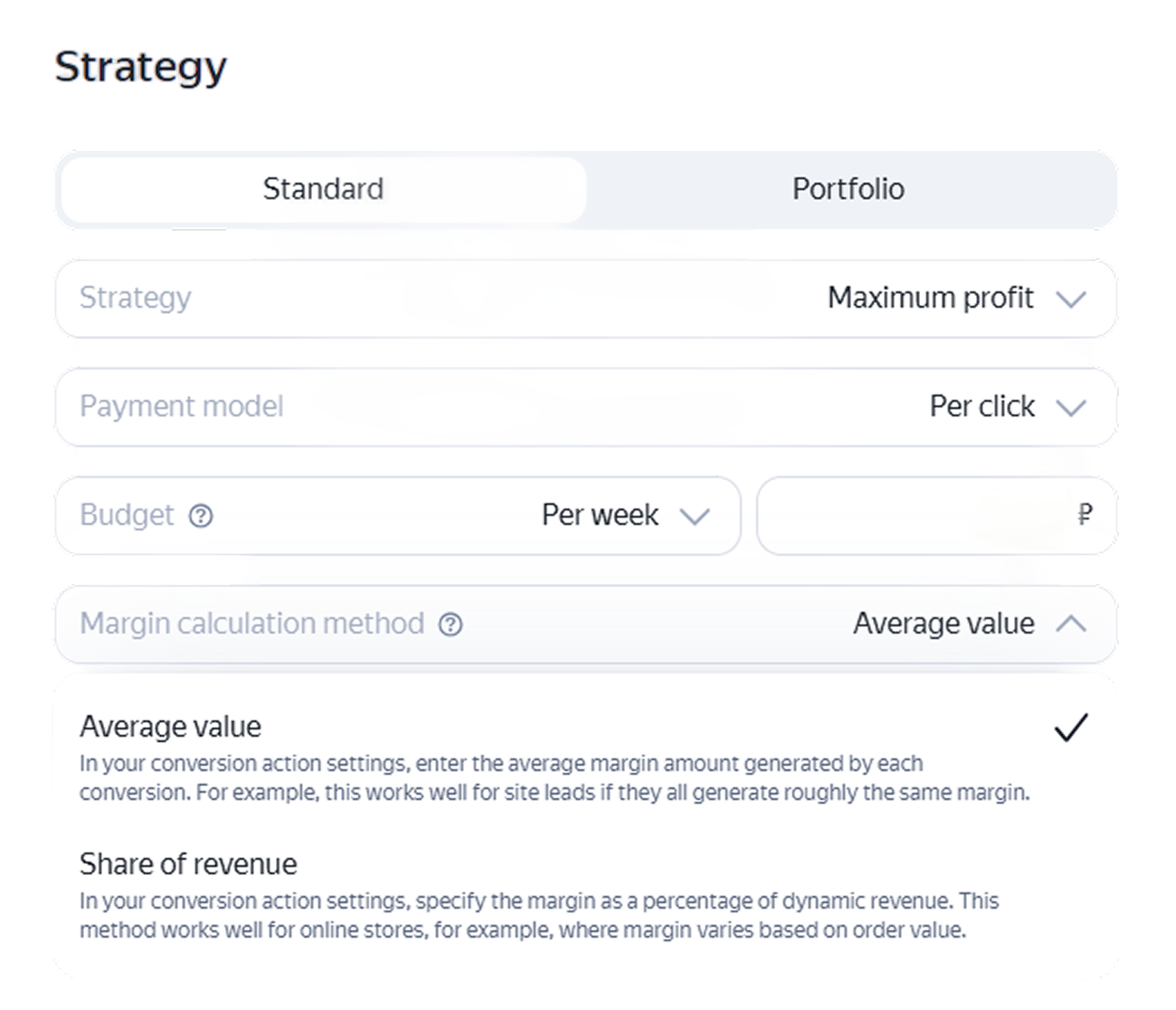
This strategy can run in one of two modes: "Average value" or "Share of revenue".
Mode "Average value"
In "Average value" mode, you can specify the average margin per conversion.
Profit per conversion is the average revenue from a single conversion minus variable costs (product cost, contractor fees, payment processing fees, and so on), without accounting for advertising costs. Enter this amount in the strategy settings.
Profit per conversion = Average sales revenue − Average sales cost, where:
-
Average sales revenue is an average revenue per sale (for example, the product or service price).
-
Average cost of sale includes all variable costs tied to a single purchase, such as product cost, contractor fees, supplies, payment processing fees, and shipping. Don't deduct fixed costs (like office rent, accounting salaries, or software development) at this stage. These costs also don't include advertising expenses (CPA).
If some goal completions don't lead to a sale, factor the goal‑to‑sale conversion rate (CR) when calculating your conversion margin:
Goal-to-sale conversion rate (CR) = Number of completed sales / Number of conversions for this goal.
Profit per conversion (for the goal) = (Average sales revenue − Average cost of sale) × CR.
Example of a profit calculation
Example 1. Cleaning service
- Strategy goal: On-site request.
- Average revenue per completed order: ₽5000
- Average order cost (including employee wages, cleaning supplies, and other variable expenses): ₽3000.
- Profit per order: ₽5000 – ₽3000 = ₽2000.
- Average conversion rate from lead to paid order: 50%.
Profit per conversion for strategy setup = ₽2000 × 50% = ₽1000.
Specify in your strategy settings: ₽1000 for the "Request" goal.
Example 2. Online movie streaming service
- Goal for this strategy: subscription.
- Subscription price: ₽300 per month.
- Average subscription duration per user: 6 months.
- Average revenue per subscription: ₽300 per month × 6 months = ₽1800.
- Variable costs to maintain subscriptions (such as content licensing fees, payment processing fees, direct customer support costs): 50% of revenue.
Profit per subscription = ₽1800 (revenue) × 50% (profit share) = ₽900.
Specify in your strategy settings: ₽900 for the "Subscription" goal.
Example 3. Online store for designer lighting
- Goal for this strategy: order paid.
- Average order value: ₽7000.
- Average product cost (procurement and packaging): ₽3500.
- Delivery cost (variable, covered by the store): ₽500.
- Payment processing fee: 2% of ₽7000 = ₽140.
Profit per purchase: ₽7000 – ₽3500 – ₽500 – ₽140 = ₽2860.
Specify in your strategy settings: ₽2860 for the "Order paid" goal.
Example 4. Real estate agency
- Strategy goal: Property selection request.
- Average agency commission per closed deal: ₽150,000.
- Variable expenses per deal (agent's commission upon closing, legal support): ₽50,000.
- Profit per closed deal: ₽150,000 – ₽50,000 = ₽100,000.
- Conversion rate from request to closed deal: 1%.
Profit per conversion for strategy setup = ₽100,000 × 1% = ₽1000.
Specify in your strategy settings: ₽1000 for the "Property selection request" goal.
We recommend evaluating the result in 7 to 14 days: at the beginning of your campaign, the strategy might need some time to accumulate initial statistics. If you get very few conversions during the learning phase, check your strategy settings.
Changing certain strategy settings resets the campaign's training. Learn more.
Mode "Share of revenue"
In "Share of revenue" mode, you can specify your margin as a percentage.
Based on this percentage, the system dynamically calculates the margin from the actual order or conversion value, helping you get maximum profit from your campaign.
Margin rate per conversion is the percentage of revenue from a single conversion minus variable costs (such as product cost, contractor fees, and payment processing), excluding advertising costs. Enter this percentage in the strategy settings.
Warning
To use "Share of revenue" mode, make sure dynamic conversion values (revenue) are configured to transfer into Yandex Direct from Yandex Metrica, mobile trackers, or offline conversion sources.
Margin rate per conversion = (Sales revenue − Cost of sale) / Sales revenue.
If not every conversion results in a sale, specify your margin rate, taking this factor into account.
For example, an online store that sells bicycles sets up a strategy for the "Ecommerce: purchase" goal. The average cost of fulfilling a successful order, which includes the product cost, shipping, and other variable costs, comes to 80% of its price. The margin rate per sale is 20%. The average conversion rate from the "Ecommerce: purchase" goal to a completed order is 75%.
So, you need to specify the margin rate for this goal as: 20% × 75% = 15%.
Based on transaction data, the algorithm selects the optimal cost revenue ratio. It balances driving a high volume of conversions with keeping advertising costs at a level that maximizes overall profit.
Strategy settings
-
Choose your payment model: pay-per-click or pay-per-conversion.
When using pay-per-conversion, you're charged only when a user completes a conversion action, which gives you more control over your campaign spending.
Warning
Note that the system doesn't charge the exact margin value specified in your settings. To increase your profit, the algorithm sets a lower target CPA or cost revenue ratio (CRR). This is the calculated value that the algorithm determined as optimal at the time of the click — it's charged when a conversion occurs. This ensures you pay for results at the exact rate needed to maximize your profit.
How billing works
Example for "Average value" mode:
You've set the average margin per lead to ₽1000 in your campaign settings. To maximize your total profit, the algorithm calculates that the optimal price for this conversion in the current auction is ₽300. When the conversion occurs, your account is charged ₽300, leaving you with ₽700 in profit from the lead.
Example for "Share of revenue" mode:
You've set a 10% margin rate in your campaign settings. A user places an order for ₽10,000, giving you a profit of ₽1000. To maximize your profit, the algorithm calculates that the optimal cost revenue ratio should be 4%. When the conversion occurs, your account is charged 4% of the margin (₽400), leaving you with a profit of ₽600 from the order.
-
Set your budget and choose a limit: per week, per period, or unlimited.
For long-term campaigns without a specific end date, we recommend setting a weekly budget. If you need to control costs for flight campaigns, use a budget for a period. We recommend setting a weekly budget of at least 10 × Profit per conversion.
Minimum budget:
-
Per week: ₽300 (values for other currencies). We recommend setting a weekly budget of at least 10 × Profit per conversion.
-
For a period: RUB 50 per day (values for other currencies). We recommend setting a period budget to at least 10 × Profit per conversion. If you specify a period longer than a week, your budget should be enough for at least ten conversions each week.
Learn more about the strategy budget.
-
-
Under Margin calculation method, select one of the strategy modes:
- Average value: Specify the average margin per conversion in your conversion settings.
- Share of revenue: Enter your margin as a percentage of dynamic revenue in your conversion settings.
-
Add a Yandex Metrica tag.
If you don't have access to the Yandex Metrica tag, you can request access to the goals configured for this tag. To do this, specify the tag and click Request access. Next, ask the tag owner to enable the Allow optimizing campaigns for goals option.
-
Select one or more conversion actions and specify your margin per completed action.
A goal is an action you want a user to complete after seeing your ad. Enter your margin per completed action without accounting for advertising costs. Based on your margin calculation method, specify the average margin or margin rate.
-
Select the attribution model in the advanced settings, if needed.
An attribution model is a rule that determines which click is assigned as the source of a session on your site. This model helps you more accurately identify the return on your investment in promotion. The bidding system uses Yandex Metrica statistics for the selected attribution model and focuses on achieving the desired result.
You should select a model based on your business type, the method you use for attracting traffic, and what information you need to obtain from it. The Automatic attribution model is set by default. You can change it as needed.
More about attribution models.
How to evaluate strategy performance
In the Report Wizard
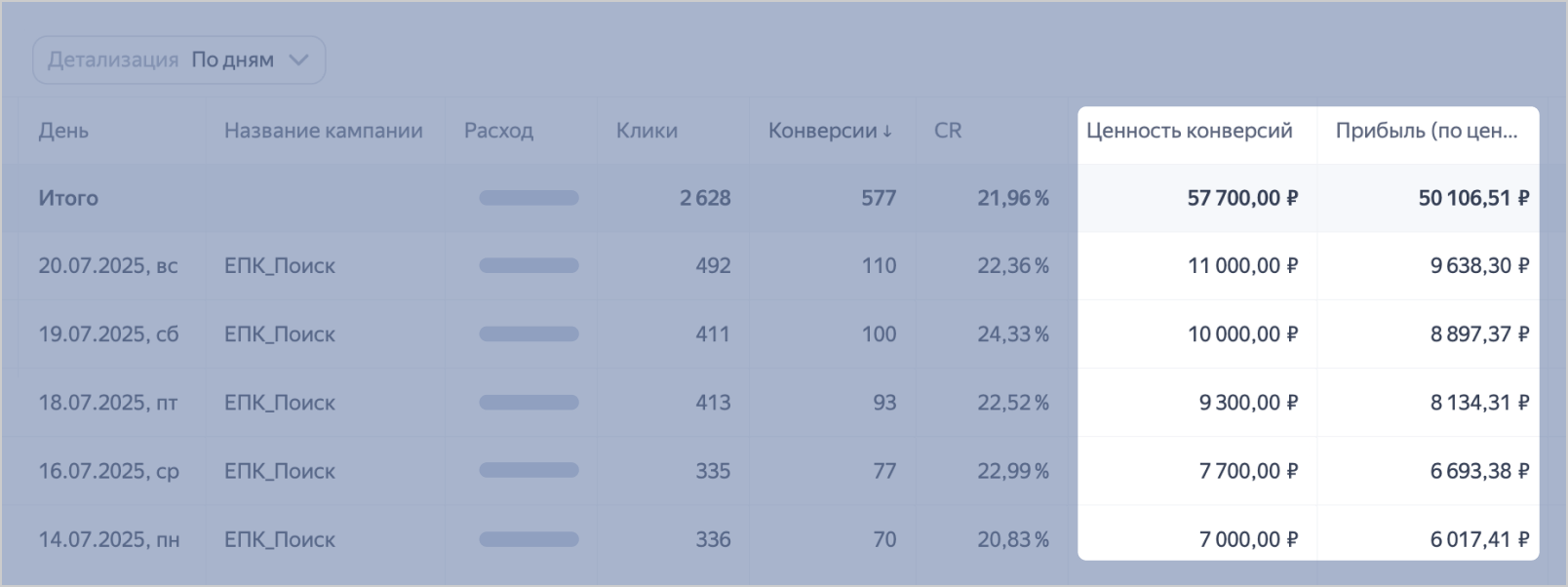
In Statistics, the total margin is shown under the conversion value metric.
- For "Average value" mode: Total margin = Margin × Number of conversions.
- For "Share of revenue" mode: Total margin = Revenue from conversions × Margin rate.
Your total profit from ads appears under the Profit (by value) metric.
Using an A/B experiment
To assess your performance against the "Maximize conversions" strategy, run an A/B experiment in Yandex Direct:
- For the control variant, select a campaign with the "Maximize conversions" strategy and set a target CPA or a CRR limit.
- For the test variant, set up a campaign with the "Maximize revenue" strategy and specify the margin or margin rate used to calculate the target CPA or CRR.
Tip
If you have enough data, we recommend using an "AABB" test setup: add two campaigns with the "Maximize conversions" strategy and two with "Maximize revenue".
Once you have enough conversions, evaluate the results to check how much profit each strategy delivered:
Profit from ads = Number of conversions × Margin or margin rate per conversion – Advertising costs
Calculate this metric for both "Maximize conversions" and "Maximize revenue" campaigns, then compare the results.
Questions and answers
When does the "Maximize revenue" strategy work best?
This strategy may not be optimal if maximizing profit isn't your current business goal. This often happens when other metrics take priority:
- Capturing market share. When you need to quickly ramp up your customer base or boost sales, even if it means reducing profit. For example, you're aiming to become a market leader.
- Clearing inventory or speeding up turnover. When you need to quickly sell off products to avoid storage costs or make room for new stock.
- Maximizing the number of customers, leads, or users. If your business is ready to run at break‑even or even at a loss early on, funding growth from borrowed or other external sources, with the aim of monetizing later (for example, via LTV).
- Strict CPA or CRR control. If you must strictly keep CPA or CRR within set limits, regardless of potential profit, to meet your internal financial benchmarks.
In these cases, the "Maximize conversions" strategy with optimization for average CPA, CRR, or budget works best. This approach helps you reach your target conversion volume, even if it means earning less profit on each deal.
How does the "Maximize revenue" strategy differ from the "Maximize conversions" strategy optimized for average CPA or CRR?
These strategies help achieve different goals. When optimizing for CPA, you need to set your target CPA. The goal of this strategy is to drive as many conversions as possible within your specified CPA. This is a great option when you need full control over your CPA or want to get as many conversions as possible within your specified CPA, especially when it takes priority over profit growth. However, when a fixed price is set, the resulting profit may not be maximized.
When optimizing for CRR, you need to specify your target cost revenue ratio. The goal here is to maximize conversions while maintaining your specified CRR. This is a great way to keep your advertising ROI in check. However, just like with CPA, setting CRR manually doesn't guarantee maximum profit, since not all CRR values are optimal for driving financial results.
With the "Maximize revenue" strategy, you need to specify your profit per conversion without accounting for advertising costs. The goal of this strategy is to find the optimal balance between cost and conversion volume to deliver the highest possible profit.
The key difference is that the "Maximize revenue" strategy continuously adjusts the CPA for maximum profit, automatically adapting to market dynamics. Keeping CPA up to date manually is virtually impossible, even if with the optimal CPA or CRR for maximum profit, because auctions are always changing.
Can I use revenue as my margin?
Your margin is only part of your revenue. If you exaggerate your margin, the strategy will aim for higher bids to capture more conversions. Although the number of conversions may grow, your actual profit per conversion will drop due to unaccounted variable costs. As a result, your profit from promotion may be lower than it could be, because you might overpay for conversions when your profit margin is inflated.
Can I use CPA as my profit margin?
If you set your margin much lower than it actually is, the strategy will optimize toward lower bids. This could mean earning more from each conversion, but the total number of conversions will drop significantly. As a result, your total profit from ads will be lower than it could be with a more accurate margin.
The closer the margin you specify is to the real one, the more profit you can generate from ads.
Why doesn't the profit margin calculation factor in advertising costs?
To run this strategy, you need to specify your profit per conversion, excluding advertising costs. This strategy aims to maximize marginal profit from promotion, meaning profit that's calculated after all variable costs, including advertising costs, are deducted. It aims to find the optimal balance between CPA and conversion volume to maximize overall profit after deducting advertising costs.
Have questions?
Alert
Our customer support can only assist you with campaigns linked to the username you are contacting us from. You can check your username by opening ya.ru in another browser tab. Our team can access your data only when processing your request.
Scan the QR code or tap it to follow the link.

When choosing Telegram, please note that Yandex does not control or take responsibility for how third-party messaging apps store your data and chat history.
Useful links
Legal documents
Training
Learn more
|
Payment currency |
Minimum weekly budget |
|
RUB |
300 |
|
KZT |
1 300 |
|
BYN |
9 |
|
USD |
10 |
|
EUR |
10 |
|
CHF |
10 |
|
TRY |
17 |
|
Payment currency |
Minimum daily budget |
|
RUB |
50 |
|
KZT |
200 |
|
BYN |
1.5 |
|
USD |
1.5 |
|
EUR |
1.5 |
|
CHF |
1.5 |
|
TRY |
2.5 |